FocusOnn
A downloadable tool for Windows
FocusOnn helps you stay locked onto your goals by displaying your active task right at the top of your screen. If you get distracted or interrupted, getting back to work is as simple as looking at the reminder bar.
🧠 Why It Works
You know how it goes: you're partway through something, your phone buzzes, a coworker speaks to you, or you open one tab too many — and ten minutes later you're somewhere else entirely, trying to remember what you were even doing.
FocusOnn is built for exactly that moment. Your primary task sits cleanly at the top of your screen the entire time. One quick glance, and you're immediately back in the zone.
🖥️ What It Looks Like
- Slim Overlay: A subtle, 40-pixel-tall bar floating along the top edge of your screen.
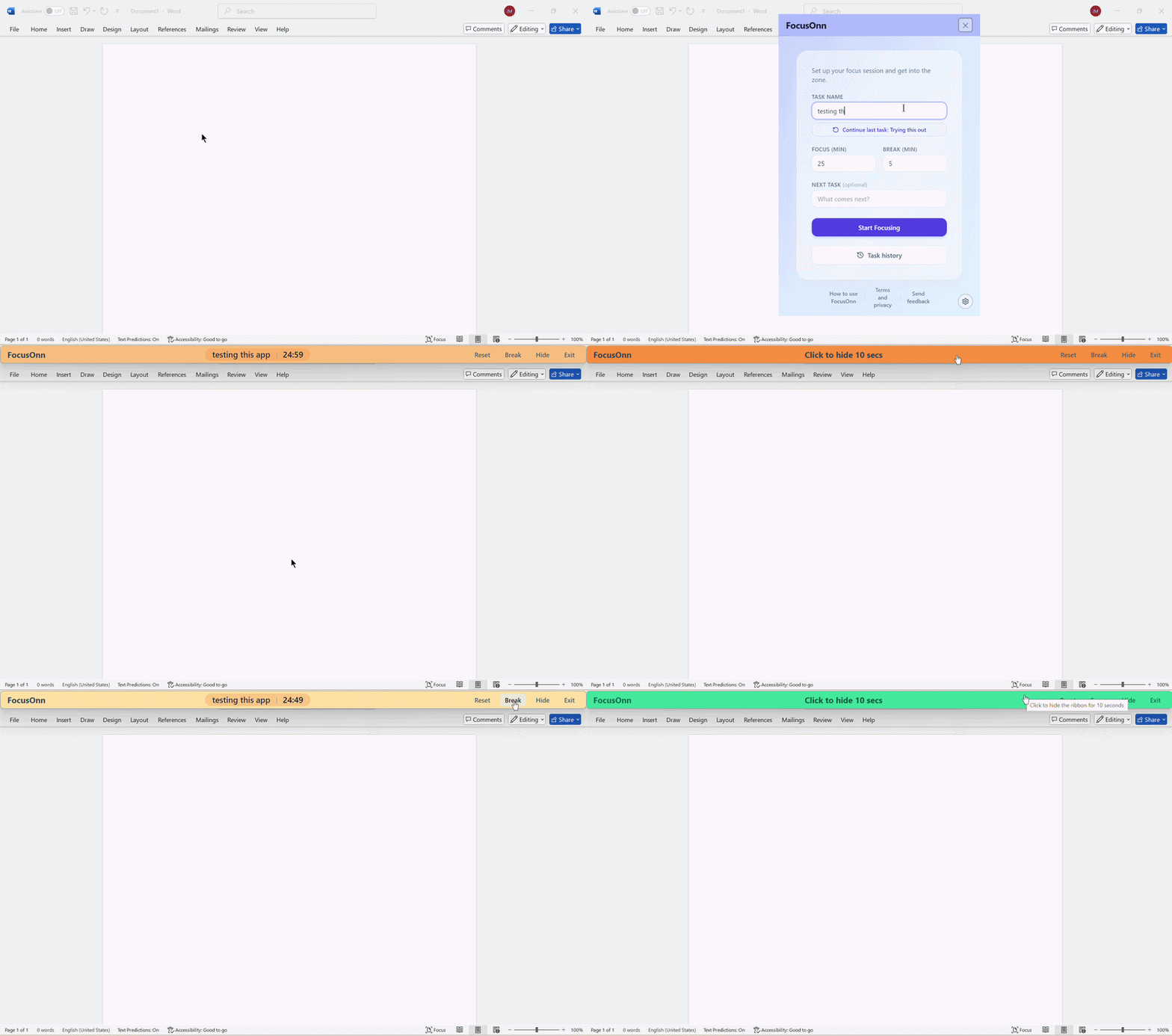
- Always-On-Top: Displays your active task and a live countdown timer over your open windows so you never lose sight of your target.
- Unobtrusive Design: Need to reach something directly underneath the bar? A quick click temporarily hides it for 10 seconds so it never gets in your way.
⏱️ Session & Rhythm Timing
The bar isn't just a static reminder — it runs a proven focus rhythm: work for a set stretch, take a short break, and repeat.
- Quick Setup: Enter your task name, set your focus duration, and choose your break length. (Optional: queue up your next task!)
- Start Focusing: The setup window closes and the bar docks at the top of your screen.
- Visual Cues: The bar adapts color dynamically as you work:
- 🟡 Yellow while focusing
- 🟢 Green during a break
- 🔴 Red when the cycle ends
- Full Control: Dedicated controls let you switch between focus and break modes, configure new sessions, or exit seamlessly.
✨ Useful Features
- Custom Heights: Choose between 40px, 50px, or 60px heights to match your display resolution.
- Session Memory: Keeps track of your completed sessions and focused minutes. Resume past tasks in one click or export your history to a spreadsheet.
- Pause-Safe Breaks: Switching between focus and break modes pauses the timer instead of resetting it — your hard-earned progress is never thrown away.
🔒 100% Private & Local-First
- Zero Telemetry: Works completely offline with no accounts, sign-ins, or analytics.
- Data Security: The app never connects to external servers; everything you type stays entirely on your computer.
- Optional Feedback: The only internet link in the app is an optional "Send Feedback" button that opens a short form in your browser if you choose to click it.
📦 Installation (Windows)
- Download and run the setup file.
- Windows SmartScreen Notice: Windows may show a standard "Unknown Publisher" warning on the first launch. This happens simply because code-signing certificates carry heavy annual fees that don't make sense for a small indie app. Click "More info", then select "Run anyway".
SHA-256 Checksum Verification: 41bca5e3285ace5081fef52169f11f4301c1044d4b2559a0a54ff25331a41cf6
💬 Feedback Welcome
FocusONN is currently in an early release phase. If you have feature ideas, run into bugs, or have thoughts on how to improve it, please click the "Send feedback" link inside the app's setup window!
Free for personal, non-commercial use.
Download
Click download now to get access to the following files:
Leave a comment
Log in with itch.io to leave a comment.